Assemble App Project Presentation
Project Overview
Assemble is a comprehensive mobile application designed to support post-secondary students in managing their academic and personal tasks. It integrates note-taking, study tools, and task management into one platform, streamlining students’ study routines and enhancing their productivity.
GitHub Repository: Assemble Project on GitHub
Vision Statement
Assemble aims to be a unified mobile application for students to handle their study and personal tasks efficiently. By integrating features such as note-taking, study aids, and task lists, it seeks to provide a seamless and efficient solution to manage academic responsibilities.
Intended Users
The primary users of Assemble are post-secondary students who need an organized approach to manage their academic workload. Additionally, the app is beneficial for individuals outside of academia who seek to improve task organization and time management through features like to-do lists and timers.
Major Functionality
- Note-Taking: Users can create, edit, and organize notes efficiently, categorizing them by subjects and topics.
- Study Tools: Includes a flashcard system for self-assessment and a Pomodoro timer to enhance productivity.
- Task Management: Features a to-do list with calendar integration for tracking assignments, exams, and deadlines, along with notifications and reminders.
- Profile Management: Users can update their profile information, including name and password, and log out of the app.
Team Members and Skills
Contributors and Skills Gained
Runyu Fang:
- Tasks: Focused on back-end development, including creating and testing API endpoints, handling caching and database operations, and implementing note management functionalities.
- Skills Gained: Advanced skills in back-end development, API design, and database management. Acquired proficiency in writing and executing test suites for both front-end and back-end components.
Ben Edgar-Prosen:
- Tasks: Worked on the flashcard feature, including creation, randomization, and deletion functionalities. Addressed issues related to flashcard management and note organization.
- Skills Gained: Developed expertise in feature implementation and debugging, particularly in dynamic content management. Gained experience in integrating and testing complex data interactions within the application.
Laraib Mahdi:
- Tasks: Implemented timer functionalities and flashcard animations, along with managing note creation and organization. Focused on enhancing user interactions with flashcards and timers.
- Skills Gained: Improved skills in animation and user interaction design. Gained experience in developing and integrating timer and notification features within an Android application.
Oghenefegor Enaibre:
- Tasks: Provided the documentation architecture for the project and oversaw the bug fixes and site creation. Managed the written components of the app documentation.
- Skills Gained: Developed expertise in project documentation and architecture. Gained experience in overseeing bug fixes, site creation, and managing comprehensive written documentation for the project.
Victor Okpube:
- Tasks: Led the implementation of user interface features, including profile settings, and logout functionalities. Developed and improved UI components for home page and user profile. Created the presentation site for the project.
- Skills Gained: Enhanced skills in UI/UX design, front-end development, and integration of interactive elements. Gained experience in implementing and testing complex UI components in Android. Acquired skills in creating and configuring static websites for presentations.
Screen Recording
Postmortem of Development Experience
What Went Right
Several aspects of our development process went well. The integration of various functionalities into a single app worked smoothly, providing a cohesive user experience. The team effectively managed tasks and deadlines, leading to a successful completion of the project. The database integration was successful thanks to Runyu Fang’s efforts, and we were able to use HSQLDB smoothly. The profile management and logout features were enhanced based on iterative feedback. Additionally, the UI components were well-designed and interactive, thanks to the focused efforts on front-end development. Our use of static websites for presentations provided a professional and clear way to showcase our work.
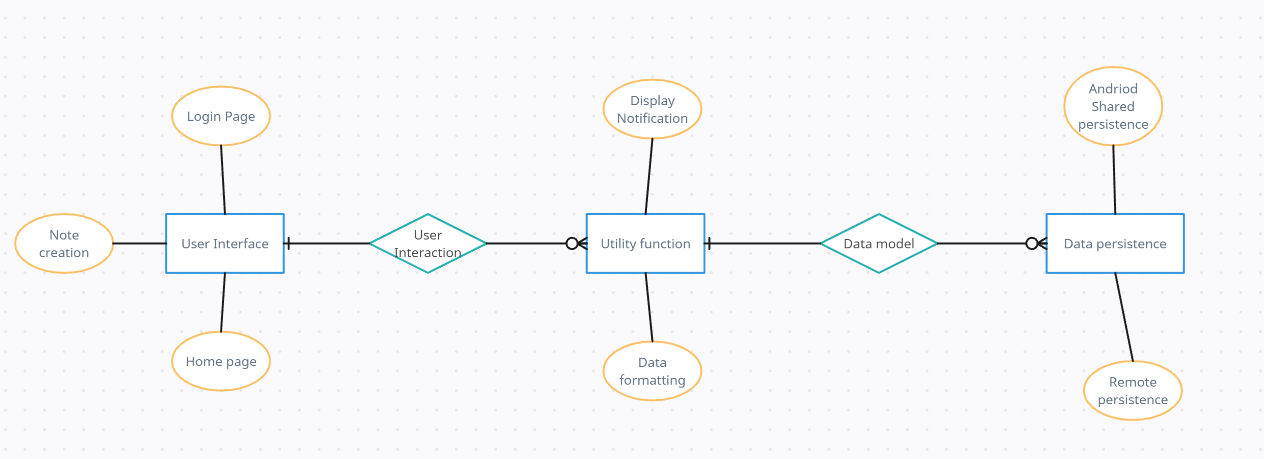
Architecture Diagram
What Went Wrong
Despite our successes, we faced several challenges. Integrating the back-end with the front-end proved to be more complex than anticipated, leading to delays and the need for extensive debugging. Miscommunication within the team sometimes led to redundant work or misaligned goals.
Identified Area for Improvement (Iteration 2 Retrospective)
During our iteration 2 retrospective, we identified the need for better coordination and documentation. Implementing a clear documentation process and architecture, overseen by Oghenefegor Enaibre, greatly improved our workflow. However, we realized that we should have integrated these practices from the start. We also had issues with the unit tests in the 2nd iteration but added sufficient tests throughout the code in the next iteration. The documentation helped us keep track of our progress and made it easier to onboard new members and maintain the project.
Project Size and Components
Our project consisted of numerous classes and methods, with a significant portion devoted to user interface components and data management. We had over 20 classes and more than 30 methods. The front-end (UI components and interaction logic) accounted for about 60% of our codebase, while the back-end (data processing, API endpoints, and database management) made up the remaining 40%.
Time Allocation
The most time-consuming tasks were integrating the front-end with the back-end and debugging the resulting issues. Surprisingly, the creation and configuration of the presentation site took less time than expected, thanks to our prior experience with static website generators.
Design Decisions
One of our most brilliant design decisions was the modular architecture of our system, which allowed us to work independently on different components. This design choice facilitated parallel development and made the system more maintainable. However, we did notice some design smells, such as tightly coupled classes that made unit testing challenging.
Technologies and Techniques
In addition to the required technologies, we utilized Jekyll for our presentation site and integrated advanced UI libraries for better user interactions. We also applied techniques such as Test-Driven Development (TDD) and pair programming to improve code quality and foster collaboration.
Project Evolution
Our project evolved significantly from the initial vision. While the core functionalities remained the same, we added several features based on user feedback and team discussions. These included enhanced profile settings, improved flashcard management, and more interactive UI components.
Lessons Learned
Throughout this project, we learned valuable lessons about team and large project development. Effective communication and clear documentation are crucial for success. Moving forward, we will continue to emphasize these practices, along with maintaining a modular system architecture and leveraging advanced development techniques.
Conclusion
In conclusion, our development experience was a mix of successes and challenges. We created a functional and user-friendly application, learned from our mistakes, and improved our development practices. This project provided us with insights into the complexities of software development and the importance of teamwork and effective project management.